
The three integration patterns
WebView + Identify API
Best for: Embedding the LearnInk learning experience inside your existing mobile app.You load the LearnInk web app inside a WebView component in your app. By pairing this with a call to the Identify API, users are automatically signed in without any friction — no separate login required.→ WebView integration overview · Identify API reference
Webhook
Best for: Receiving real-time notifications about user activity in LearnInk.LearnInk sends a
POST request to your backend endpoint whenever a subscribed event occurs — for example, when a user registers, completes a course, or earns a certificate.→ Webhook overview · Push notifications guideData sync
Best for: Deep analysis of learning data in your own BI tools or data warehouse.LearnInk provisions a dedicated read-only Postgres database containing all of your organisation’s learning data, updated every 24 hours. You can connect it directly to tools like Looker, Metabase, or Tableau, or query it with SQL.→ Data sync overview
How they fit together
The diagram below shows how a typical integration combines all three patterns.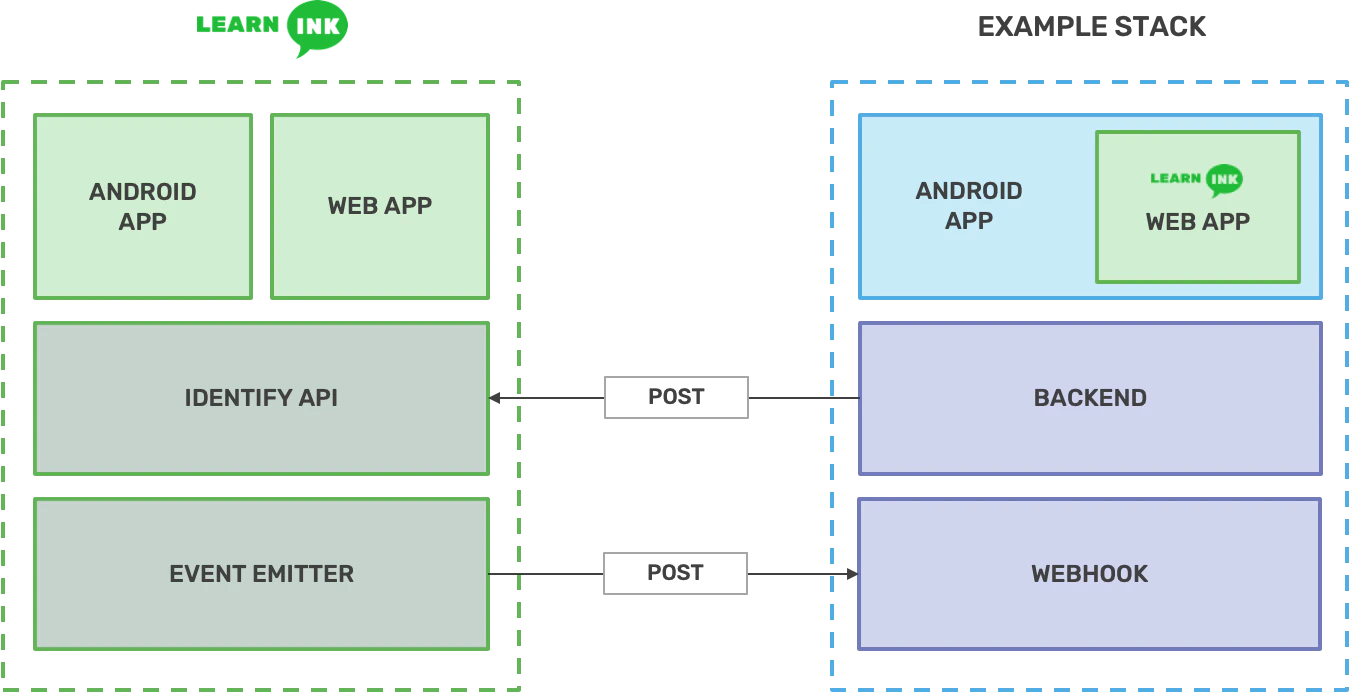
- A user opens your mobile app and navigates to the training section
- Your app calls your backend, which calls the LearnInk Identify API and returns a sign-in token
- Your app loads the LearnInk WebView with the token — the user is automatically signed in
- As the user completes training, LearnInk sends webhook events to your backend (e.g.
user.course.completed) - LearnInk also sends
notifications.sentwebhook events containing push notification payloads — your backend should forward these to users via your own notification infrastructure - Every 24 hours, LearnInk syncs learning data to your dedicated Postgres database for reporting